


Get Kill Bill
Download Kill Bill, Free and Open Source
Run Kill Bill on your laptop with Docker, deploy it on your own infrastructure, or try the Aviate sandbox in your browser first.
Last updated: October 2026
Trusted by companies processing billions in revenue








Short answer
How do I download Kill Bill?
Kill Bill is free and open source under the Apache 2.0 license. The fastest way to run it is Docker: one docker-compose.yml file starts Kill Bill, Kaui (the admin UI) and a MariaDB database on your laptop in a few minutes. You can also download the Kill Bill and Kaui WAR files from Maven Central and run them in Tomcat, deploy them on Kubernetes, or build from the source code on GitHub. To see Aviate, the enterprise offering of Kill Bill, without installing anything, use the free sandbox.
Quick Start
Up and Running in a Few Minutes
Start exploring Kill Bill locally with one Docker Compose file. No cloud account or credit card required.
1
Start Kill Bill with Docker Compose
Save this file as
docker-compose.yml:Show docker-compose.yml
services:
  killbill:
    image: killbill/killbill:latest
    ports:
      - "8080:8080"
    environment:
      - KILLBILL_DAO_URL=jdbc:mysql://db:3306/killbill
      - KILLBILL_DAO_USER=root
      - KILLBILL_DAO_PASSWORD=killbill
      - KILLBILL_CATALOG_URI=SpyCarAdvanced.xml
  kaui:
    image: killbill/kaui:latest
    ports:
      - "9090:8080"
    environment:
      - KAUI_CONFIG_DAO_URL=jdbc:mysql://db:3306/kaui
      - KAUI_CONFIG_DAO_USER=root
      - KAUI_CONFIG_DAO_PASSWORD=killbill
      - KAUI_KILLBILL_URL=http://killbill:8080
  db:
    image: killbill/mariadb:0.24
    volumes:
      - db:/var/lib/mysql
    environment:
      - MYSQL_ROOT_PASSWORD=killbill
volumes:
  db:
Then, from the same folder, run:
docker compose up
Requires Docker Desktop. Starts Kill Bill (port 8080), Kaui (port 9090) and a MariaDB database. The first start takes a few minutes.
2
Open the Kaui admin dashboard
Once startup finishes, visit http://localhost:9090 and log in with admin/password. Change this password before any shared use. Kaui is the open source admin UI of Kill Bill.
3
Set up your billing
Use Kaui to create a catalog with your plans, add customer accounts, and create subscriptions. Invoices are generated automatically based on your catalog configuration.
docker compose up starts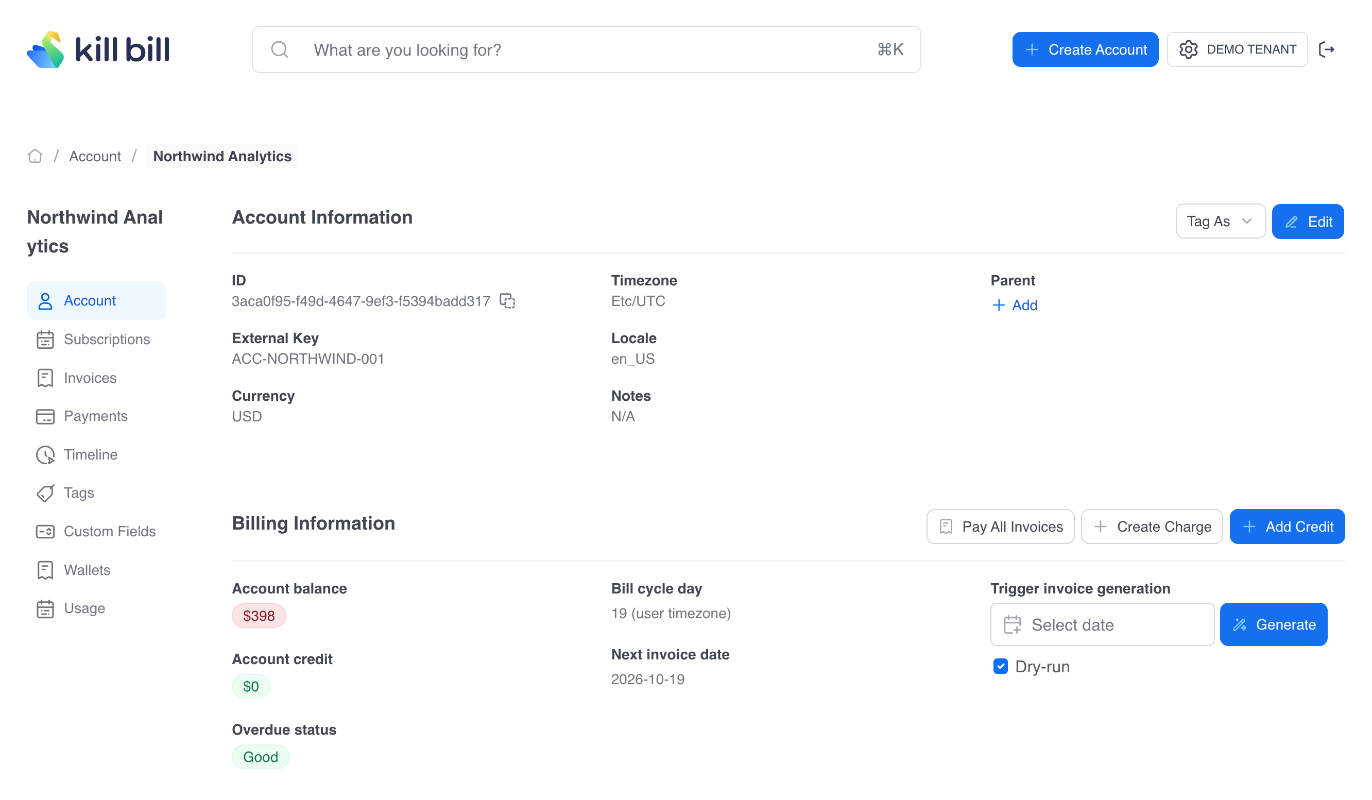
Download Options
Ways to Get Kill Bill
Every option below is the same open source Kill Bill, free under the Apache 2.0 license.
| Option | What you get | Best for |
|---|---|---|
 Docker Compose Docker Compose | Kill Bill, Kaui and MariaDB from one file. Docker guide | Trying Kill Bill on a laptop |
| Docker images | The official killbill/killbill and killbill/kaui images on Docker Hub | Containers in your own cloud or data center |
 WAR files in Tomcat WAR files in Tomcat | Kill Bill and Kaui WAR files from Maven Central. Tomcat guide | Teams that run Java web applications |
 Kubernetes Kubernetes | A step-by-step deployment guide. Kubernetes guide | Production on a Kubernetes cluster |
 Source code Source code | The full code on GitHub, built with Maven | Contributors and custom builds |
 Aviate sandbox Aviate sandbox | Aviate in your browser, with nothing to install. Try the sandbox | Seeing the enterprise features before you commit |
Requirements
What You Need to Run Kill Bill
- License
- Apache 2.0, free, no fee per transaction
- Docker
- Docker and Docker Compose, with at least 4 GiB of memoryDocker
- Java
- JDK 11, OpenJDK by default, for a Tomcat install
 OpenJDK
 - Web container
- Tomcat 9.0.x recommendedTomcat
- Database
- MySQL, MariaDB or PostgreSQL
 MySQL
MySQL MariaDB
 PostgreSQL
 - Ports
- Kill Bill API on
8080, Kaui on9090with Docker Compose - First login
- Kaui user
admin, passwordpassword - Help
- Community mailing list, without SLA. Level 3 support with Aviate

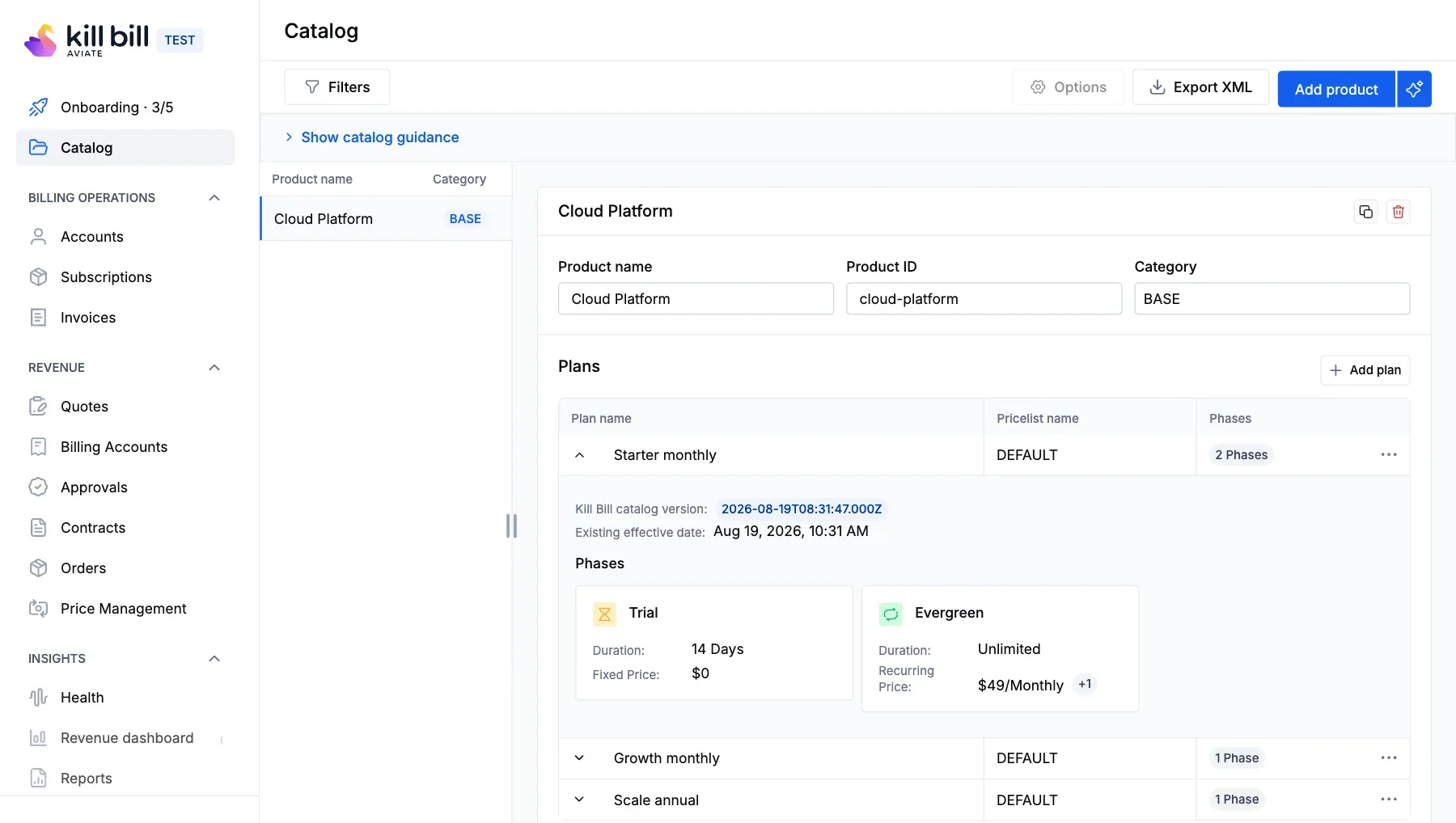
Aviate Sandbox
Try Aviate, the enterprise offering of Kill Bill, in a free hosted sandbox.
No installation required
Best for evaluating the enterprise features

Self-Managed Open Source
Run Kill Bill on your own infrastructure, free under the Apache 2.0 license.
Install with Docker, in Tomcat or on Kubernetes
Best for technical teams
DockerTomcatKubernetesGitHubFAQs
Download FAQ
Is Kill Bill free to download?
Yes. Kill Bill is open source under the Apache 2.0 license. You can download it, run it in production and change the code, with no license fee and no fee per transaction. The open source version comes without support or SLA.
What is the fastest way to try Kill Bill?
Use Docker Compose. Save the docker-compose.yml file from this page and run docker compose up. After a few minutes, the Kill Bill API answers on port 8080 and Kaui, the admin UI, on port 9090. To try Aviate without installing anything, use the free sandbox.
What do I need to run Kill Bill?
With Docker, you need Docker and Docker Compose and at least 4 GiB of memory. For a Tomcat install, you need JDK 11, Tomcat 9.0.x and a MySQL, MariaDB or PostgreSQL database.
Which databases does Kill Bill support?
The Kill Bill team uses MySQL and runs regression tests against MariaDB and PostgreSQL. Users have also deployed Kill Bill with Percona and Aurora.
Can I run Kill Bill without Docker?
Yes. Download the Kill Bill and Kaui WAR files from Maven Central and deploy them in Tomcat, then create the database with the Kill Bill DDL. The getting started guide on docs.killbill.io explains each step.
Can I deploy Kill Bill on Kubernetes?
Yes. The documentation includes a step-by-step guide to deploy Kill Bill and Kaui on a Kubernetes cluster.
What is the default Kaui login?
After the Docker quick start, log in to Kaui at http://localhost:9090 with the user admin and the password password. Change it before any shared use.
Where is the Kill Bill source code?
The source code is on GitHub at github.com/killbill/killbill, with Kaui and the plugins in the same GitHub organization.
Start building with Kill Bill today.
Download the open-source core, explore the enterprise sandbox, or read the docs to start building.

Support
Work directly with the Kill Bill core team

Kill Bill Community
For technical questions, start by asking the Community

Documentation
Organized product documentation library and API Reference

Customization
Work with experts for Kill Bill customization