


Aviate · Native feature
Prepaid Credits and Wallets in Aviate
Sell prepaid credits, grant free credits and top off balances automatically. Aviate Wallet keeps one balance per account, and Kill Bill uses the credits when it generates usage invoices.
 Aviate Wallet is native to Aviate, the enterprise offering of Kill Bill
 Not part of Kill Bill open source
Last updated: October 2026
Trusted by companies processing billions in revenue








Short answer
Aviate Wallet is the prepaid credit feature of Aviate, the enterprise offering of Kill Bill. Each account has one wallet in its currency. Paid credits create an invoice and a payment attempt. Free credits create neither. Credits can expire. Kill Bill uses the credits when it generates usage invoices, and when the balance falls below a low water mark, the wallet tops off automatically. Kill Bill open source has account credits, which are used on the next invoices, but no wallet, top-off or expiration.
At a Glance
Aviate Wallet at a Glance
- What it does
- Holds prepaid credits for an account and uses them on usage invoices
- Wallets
- One per account, in the account's default currency
- Credit types
- Paid credits, invoiced and paid (CREDIT_PAID). Free credits, with no invoice (CREDIT_FREE). Credits used on invoices are recorded automatically (CREDIT_USED)
- Automatic top-off
- Below a low water mark: TOP_OFF_FIXED adds a fixed amount, TOP_OFF_TARGET brings the balance back to a target
- Expiration
- Optional: an expiration date per credit, or a duration for top-off credits. Expired credits drop to zero
- Balances
- Balance, and live balance: the balance minus credits held for invoices being generated
- Where
- Wallet API, and the Wallets tab of Kaui with Aviate
- Open source or Aviate
- Aviate only. Kill Bill open source has account credits
Open Source and Aviate
Account Credit or Aviate Wallet
Kill Bill open source can credit an account. Aviate adds a wallet that you can sell, top off and expire.
| Kill Bill open source | Aviate Wallet | |
|---|---|---|
| Give a credit | Account credit through the credits API | Free credits (CREDIT_FREE), with no invoice |
| Sell credits upfront | No dedicated flow | Paid credits (CREDIT_PAID): an invoice and a payment attempt with the default payment method |
| How credits are used | Automatically, on the next invoices of the account | When Kill Bill generates usage invoices |
| Automatic top-off | Not included | Fixed amount or target balance, below a low water mark |
| Expiration | Not included | Optional expiration date per credit |
| History | Credit items on the account's invoices | Wallet records: original and remaining amount, linked invoice and payment |
Capabilities
What You Can Do With a Wallet
Sell Prepaid Credits
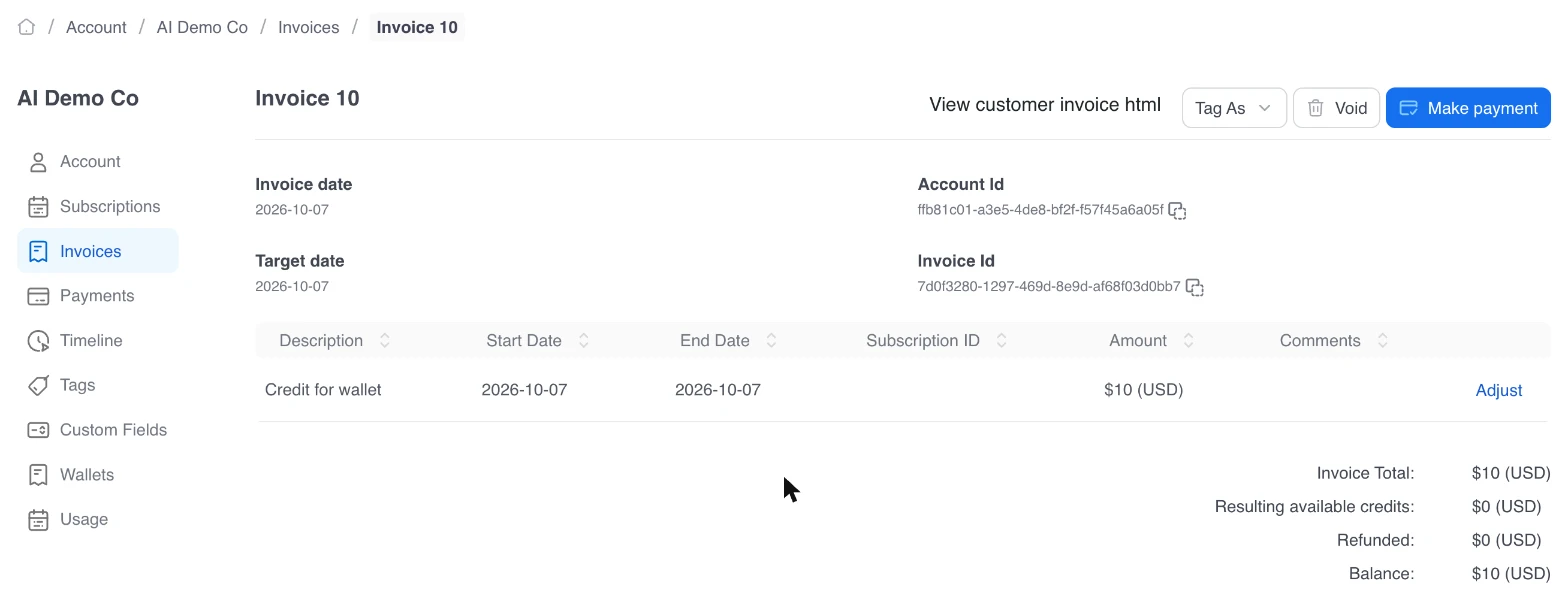
Paid credits create a "Credit for wallet" invoice, and Kill Bill attempts payment with the account's default payment method.
Wallet guide →
Grant Free Credits
Free credits, such as a sign-up bonus or a loyalty reward, go straight into the wallet. No invoice and no payment.
Credit types →
Top Off Automatically
Below the low water mark, the wallet adds a fixed amount or returns to a target balance. Each top-off is invoiced and payment is attempted automatically.
Top-off modes →
Expire Credits
Set an expiration date on a credit, or a duration in days, months or years for top-off credits. When credits expire, their remaining amount drops to zero.
Expiration →
Pay for Usage From Credits
Kill Bill uses wallet credits when it generates usage invoices. Pair the wallet with Aviate Metering for prepaid usage billing.
AI usage tutorial →
Track Every Credit
Each wallet record keeps the original and remaining amount, with the invoice and payment it belongs to.
Wallet records →
Worked Example
A $10 Wallet That Tops Itself Off
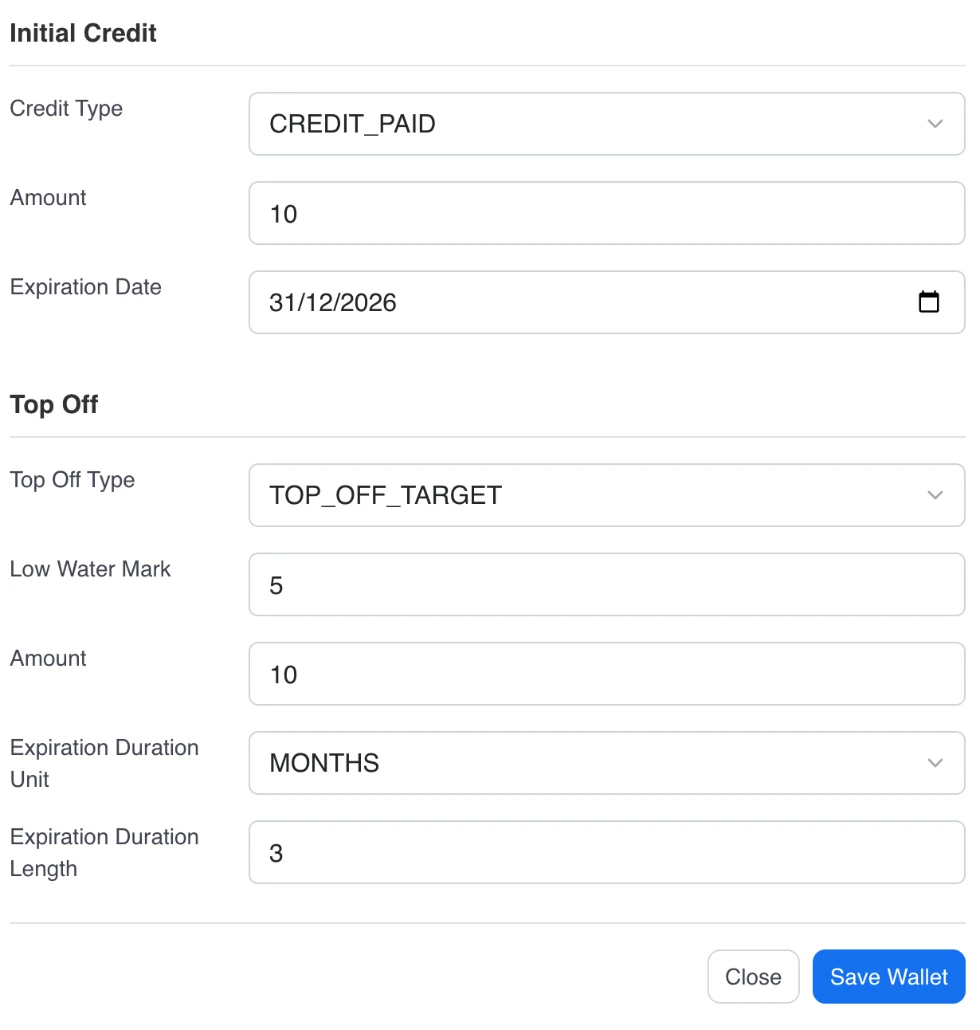
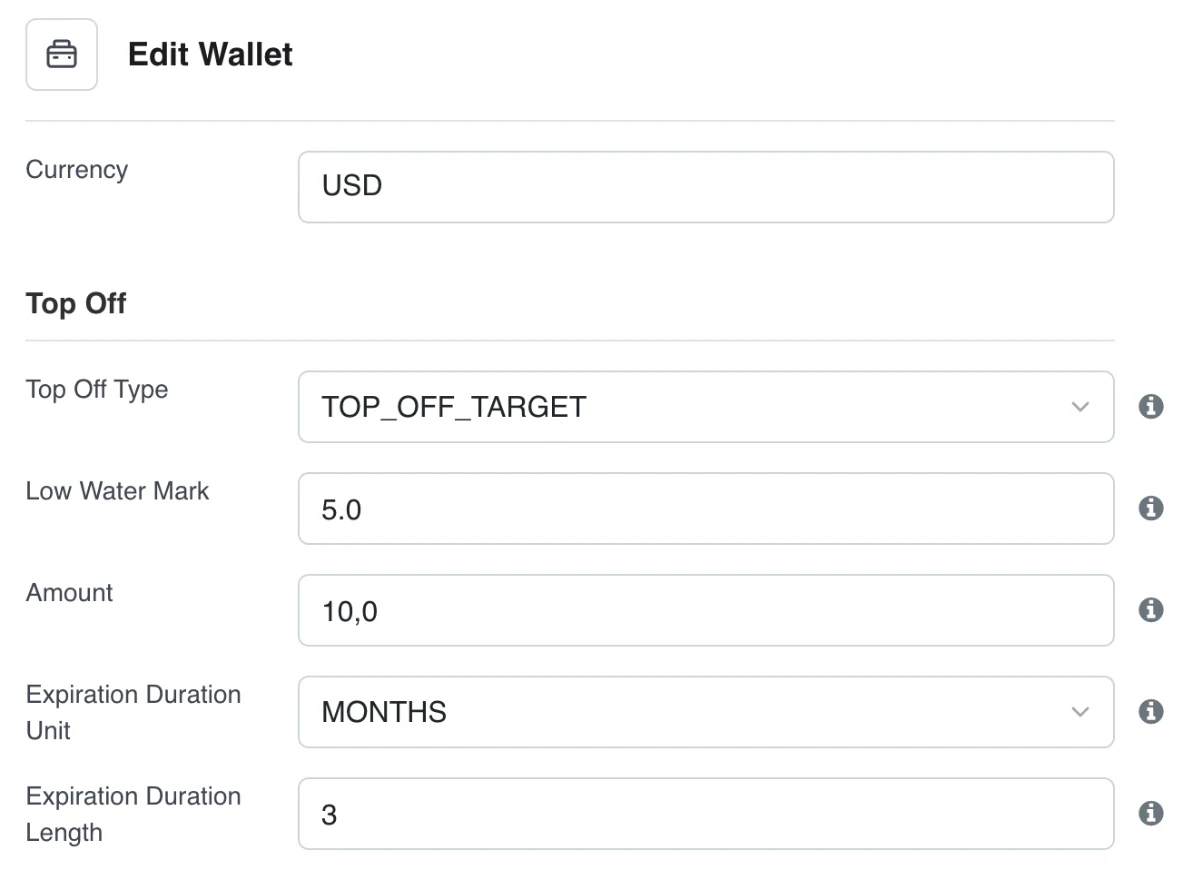
The top-off settings of the AI usage tutorial, recreated in a test environment for a demo account, AI Demo Co.
| Setting | Value |
|---|---|
| Initial credit | $10.00 of paid credit, expiring December 31, 2026 |
| Top-off type | TOP_OFF_TARGET |
| Low water mark | $5.00 |
| Target amount | $10.00 |
| Top-off credits | Expire after 3 months |
For example, a usage invoice of $6.00 takes the balance from $10.00 to $4.00, below the low water mark. The wallet tops off with $6.00 of paid credit and, once that invoice is paid, is back at $10.00.
In the Product
The Example in Kaui and the API
The same wallet, set up in a test environment. With Aviate, Kaui has a Wallets tab on each account.
 Wallet API Aviate plugin endpoints
POST /plugins/aviate-plugin/v1/wallet # create a wallet
GET /plugins/aviate-plugin/v1/wallet/{accountId} # read the wallet, balances and records
PUT /plugins/aviate-plugin/v1/wallet/{walletId}/credit # add paid or free credits
PUT /plugins/aviate-plugin/v1/wallet/{walletId}/topOffConfig # set the automatic top-offScreenshots from a test environment, with a demo account, AI Demo Co.
Why Kill Bill
Why Use Aviate Wallet for Prepaid Credits
Paid Before Use
Paid credits are invoiced and paid upfront. Usage is then paid from the balance.
One Billing System
Credit purchases and top-offs are Kill Bill invoices and payments, in the same account history as subscriptions and usage.
Data Stays With You
Deploy on your own infrastructure. Wallets, invoices and payments live in your database.
 MySQL
MySQL MariaDB
 PostgreSQL
In Production Since 2010
Deployments on the platform have invoiced billions of dollars since 2010.
Typical Setups
How Prepaid Businesses Set It Up
AI Token Credits
Sell token credits, meter tokens per request, and top off below a threshold.
AI billing use case →
Prepaid Compute
Sell compute credits that expire, and bill compute usage from them.
NeoCloud use case →
Sign-Up Bonus
Grant free credits to new accounts, then sell paid credits once they run out.
Free credits →
Example setups, not customer case studies.
FAQs
Prepaid Credits FAQ
What is the difference between Kill Bill account credit and Aviate Wallet?
Kill Bill open source can credit an account, and the credit is used automatically on the next invoices. Aviate Wallet is a prepaid balance per account: you can sell credits, grant free credits, set an expiration date and top off the balance automatically.
What is the difference between paid and free credits?
Paid credits create an invoice for the credit amount, and Kill Bill attempts payment with the account's default payment method. Free credits, such as a sign-up bonus, create no invoice and no payment.
How does automatic top-off work?
You set a low water mark and an amount. When the balance falls below the mark, TOP_OFF_FIXED adds the amount and TOP_OFF_TARGET adds enough to bring the balance back to the amount. Each top-off creates an invoice, and payment is attempted automatically.
Do wallet credits expire?
Only if you want them to. A credit can have an expiration date, and top-off credits can expire after a number of days, months or years. When a credit expires, its remaining amount is set to zero.
What happens if the payment for paid credits fails?
The credits are recorded but stay inactive, and do not count in the balance, until the payment succeeds.
Can an account have wallets in several currencies?
No. Each account has one wallet, in the account's default currency.
Ready to Offer Prepaid Credits?
Set up a wallet in the sandbox, or talk to our team about your credit model.