


Developers
The Kill Bill API, in Your Language
Everything in Kill Bill is an API call: catalog, customers, subscriptions, usage, invoices and payments. Call it from any language, with client libraries for six, or from an AI assistant through MCP.
Last updated: October 2026
Short answer
How do developers use Kill Bill?
Through a REST API with JSON over HTTP, on their own Kill Bill server. Each call carries a user and password plus a tenant API key and secret. Client libraries exist for Java, Ruby, Python, Go, PHP and JavaScript, Kill Bill posts events to your URL, and the aviate-mcp server lets AI assistants call the same API.
- Style
- REST, JSON over HTTP
- Base path
- /1.0/kb/ on your Kill Bill server
- Authentication
- User and password, plus a tenant API key and secret
- Client libraries
- Java, Ruby, Python, Go, PHP, JavaScript
- Events
- Push notifications to your URL, or a plugin
- AI agents
- aviate-mcp server, about 127 tools
Your first call
Create a Customer Account, in Six Languages
The same call in cURL and in each client library: create an account for John Doe, billed in US dollars.
curl -v \
     -X POST \
     -u admin:password \
     -H 'X-Killbill-ApiKey: bob' \
     -H 'X-Killbill-ApiSecret: lazar' \
     -H 'X-Killbill-CreatedBy: tutorial' \
     -H 'Content-Type: application/json' \
     -d '{ "name": "John Doe", "currency": "USD"}' \
     'http://127.0.0.1:8080/1.0/kb/accounts'
import org.killbill.billing.catalog.api.Currency;
import org.killbill.billing.client.KillBillClientException;
import org.killbill.billing.client.KillBillHttpClient;
import org.killbill.billing.client.RequestOptions;
import org.killbill.billing.client.api.gen.AccountApi;
import org.killbill.billing.client.model.gen.Account;
KillBillHttpClient client = new KillBillHttpClient("http://127.0.0.1:8080",
"admin",
"password",
"bob",
"lazar");
AccountApi accountApi = new AccountApi(client);
Account body = new Account();
body.setName("John Doe");
body.setCurrency(Currency.USD);
RequestOptions requestOptions = RequestOptions.builder()
.withCreatedBy("tutorial")
.build();
Account account = accountApi.createAccount(body, requestOptions);import killbill
killbill.configuration.base_uri = 'http://127.0.0.1:8080'
killbill.configuration.username = 'admin'
killbill.configuration.password = 'password'
account_api = killbill.api.AccountApi()
body = killbill.models.account.Account(name='John Doe', currency='USD')
account = account_api.create_account(body, 'tutorial', 'bob', 'lazar')require 'killbill_client'
KillBillClient.url = 'http://127.0.0.1:8080'
options = {
:username => 'admin',
:password => 'password',
:api_key => 'bob',
:api_secret => 'lazar'
}
body = KillBillClient::Model::Account.new
body.name = 'John Doe'
body.currency = 'USD'
account = body.create('tutorial', nil, nil, options)import (
"context"
"encoding/base64"
"github.com/go-openapi/runtime"
httptransport "github.com/go-openapi/runtime/client"
"github.com/go-openapi/strfmt"
"github.com/killbill/kbcli/kbclient"
"github.com/killbill/kbcli/kbclient/account"
"github.com/killbill/kbcli/kbmodel"
)
trp := httptransport.New("127.0.0.1:8080", "", nil)
authWriter := runtime.ClientAuthInfoWriterFunc(
func(r runtime.ClientRequest, _ strfmt.Registry) error {
encoded := base64.StdEncoding.EncodeToString([]byte("admin:password"))
if err := r.SetHeaderParam("Authorization", "Basic "+encoded); err != nil {
return err
}
if err := r.SetHeaderParam("X-KillBill-ApiKey", "bob"); err != nil {
return err
}
if err := r.SetHeaderParam("X-KillBill-ApiSecret", "lazar"); err != nil {
return err
}
return nil
})
createdBy := "tutorial"
defaults := kbclient.KillbillDefaults{
CreatedBy: &createdBy,
}
client := kbclient.New(trp, strfmt.Default, authWriter, defaults)
body := &kbmodel.Account{
Name: "John Doe",
Currency: "USD",
}
newAccount, err := client.Account.CreateAccount(
context.Background(),
&account.CreateAccountParams{
Body: body,
ProcessLocationHeader: true,
})
if err == nil {
print(newAccount.GetPayload().AccountID)
}require_once(__DIR__ . '/vendor/autoload.php');
$config = Killbill\Client\Swagger\Configuration::getDefaultConfiguration();
$config->setHost('http://127.0.0.1:8080')
->setUsername('admin')
->setPassword('password')
->setApiKey('X-Killbill-ApiKey', 'bob')
->setApiKey('X-Killbill-ApiSecret', 'lazar');
$accountApi = new Killbill\Client\Swagger\Api\AccountApi(null, $config);
$accountData = new Killbill\Client\Swagger\Model\Account();
$accountData->setName('John Doe');
$accountData->setCurrency('USD');
$account = $accountApi->createAccount($accountData, 'tutorial', NULL, NULL);Examples from the API quick start, for a local Kill Bill with the default test credentials.
How a call works
Three Things Every Call Says
Who you are, which tenant you work in, and who made the change. The rest is plain JSON.
POST http://127.0.0.1:8080/1.0/kb/accounts
-u admin:password
X-Killbill-ApiKey: bob
X-Killbill-ApiSecret: lazar
X-Killbill-CreatedBy: tutorial
Content-Type: application/json
{ "name": "John Doe", "currency": "USD" }
Who you areA Kill Bill user, with basic authentication. Users and roles control what each one can do.
Which tenantAn API key and secret pick the tenant: a business unit, a brand or a test environment, each with its own data and settings.
Who made the changeEvery write records who did it, with an optional reason and comment, in the audit log.
A typical integration
Seven Calls From Catalog to Invoice
Most integrations follow the same path. Kill Bill then generates invoices and collects payments on its own, on schedule.
- OnceCreate a tenant
POST /1.0/kb/tenants - OnceUpload your catalog
POST /1.0/kb/catalog/xml - Per customerCreate an account
POST /1.0/kb/accounts - Per customerAdd a payment method
POST /1.0/kb/accounts/{accountId}/paymentMethods - Per customerSubscribe to a plan
POST /1.0/kb/subscriptions - Each periodRecord usage
POST /1.0/kb/usages - Any timeRead invoices
GET /1.0/kb/accounts/{accountId}/invoices
To react to what happens next, such as an invoice created or a payment failed, register a URL for push notifications.
Client libraries
Client Libraries
Open source, under the Apache 2.0 license, on GitHub. Any other language can call the REST API directly.
| Language | Repository | Status |
|---|---|---|
| Java | killbill-client-java | Updated with Kill Bill releases |
| Ruby | killbill-client-ruby | Updated with Kill Bill releases |
| Python | killbill-client-python | Generated from the API definition |
| Go | kbcli | Generated from the API definition |
| PHP | killbill-client-php | Generated from the API definition |
| JavaScript and Node.js | killbill-client-js | Generated from the API definition |
For AI agents
An MCP Server That Runs Next to Your Kill Bill
Ask an AI assistant to do billing work in plain English. The aviate-mcp server turns the request into Kill Bill and Aviate API calls.
Your AI assistant
Create a product with a monthly price and a usage component, subscribe a customer, record usage, and show me the invoices.
→
aviate-mcp, on your machine
kb_*Kill Bill API: accounts, subscriptions, invoices, payments, catalog, tags, custom fields, audit logsaviate_*Aviate API: catalog, billing meters, wallets, coupons, usageadminwhoami, list and switch deployments and tenants→
Your Kill Bill
Credentials stay with you. No hosted endpoint.Read the announcement on the Kill Bill blog.
Aviate
Aviate APIs
Aviate adds APIs for its modules, on the same Kill Bill server.
 Catalog APICreate products, plans and price lists one by one, without uploading a full XML catalog.Metering APISend raw usage events. Aviate aggregates them per billing meter and records them for invoicing.Wallet APICreate wallets, add free or paid credits and configure automatic top-off.Coupons APICreate discount codes and apply them when a subscription is created.
Base path
/plugins/aviate-plugin/v1, with a JWT ID token as a Bearer token (valid about 60 minutes)Resources
Everything to Get Started
The API reference documents every endpoint, with a request example in each language.
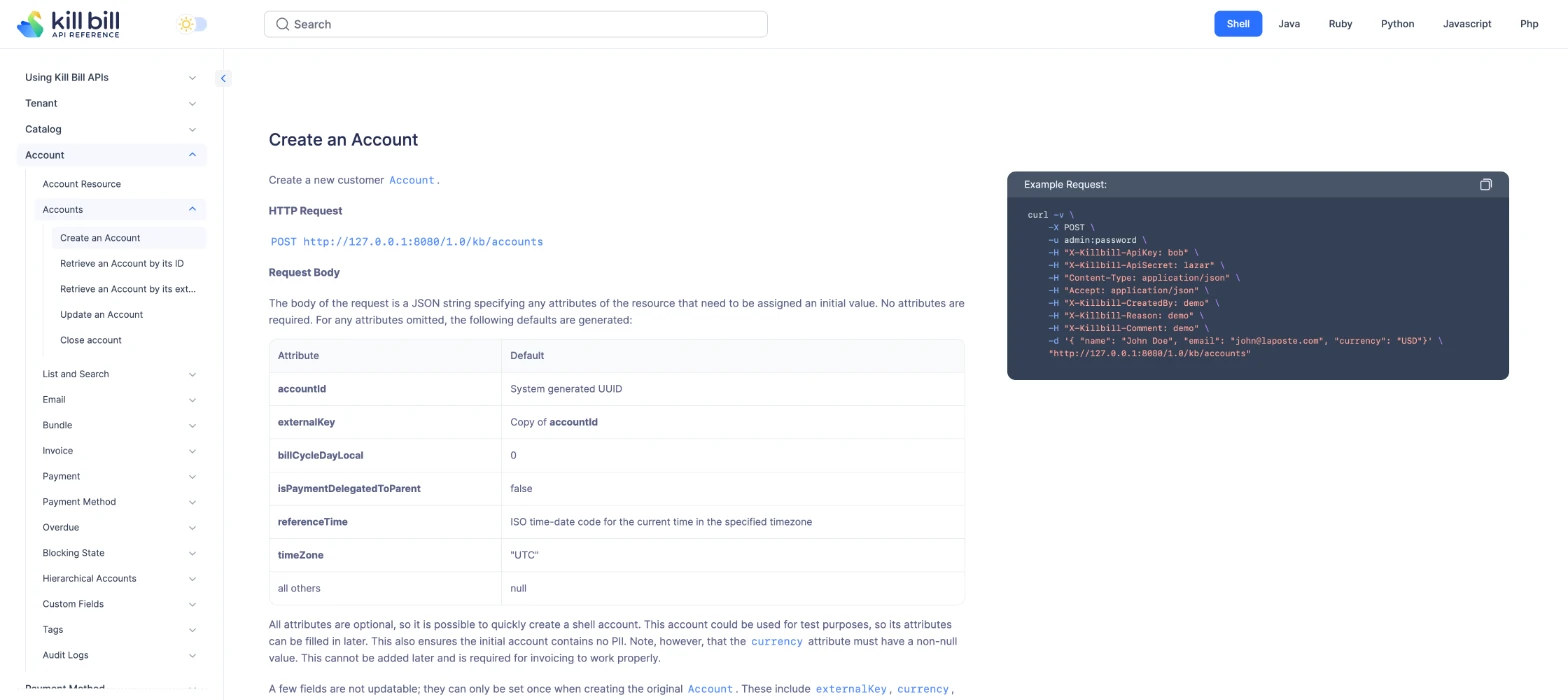
API referenceEvery endpoint, with examples in cURL, Java, Ruby, Python, JavaScript and PHP.Swagger UIBuilt into Kill Bill at /api.html, to try any call from the browser.Push notificationsRegister a URL and Kill Bill posts every event of the tenant to it, with retries.API quick startTenant, catalog, account, payment method and subscription, step by step.
FAQs
Frequently Asked Questions
Does Kill Bill have a REST API?
Yes. Everything in Kill Bill is available through a REST API with JSON over HTTP, under /1.0/kb/ on your own Kill Bill server: tenants, catalog, accounts, payment methods, subscriptions, usage, invoices, payments, tags, custom fields and audit logs. Kaui, the admin UI, uses the same API.
How do I authenticate to the Kill Bill API?
Each call carries a Kill Bill user and password with basic authentication, and the API key and secret of the tenant in the X-Killbill-ApiKey and X-Killbill-ApiSecret headers. Calls that change data also carry X-Killbill-CreatedBy, which is recorded in the audit log.
Which programming languages have a Kill Bill client library?
Java, Ruby, Python, Go, PHP and JavaScript. The Java and Ruby clients are updated with Kill Bill releases. The others are generated from the API definition. Any language that can send HTTP requests can call the API directly.
Is there an OpenAPI or Swagger definition?
Yes. Kill Bill ships Swagger UI at /api.html on the server, where you can browse and try every call. The full reference with examples is at apidocs.killbill.io.
Does Kill Bill support webhooks?
Yes, through push notifications. Register a callback URL for a tenant, and Kill Bill sends each event to it by HTTP POST, with retries if your endpoint does not answer with a 2xx status. Plugins can also listen to every event inside Kill Bill.
Does Kill Bill have an MCP server for AI agents?
Yes. The aviate-mcp server exposes Kill Bill and Aviate APIs as about 127 tools for MCP clients such as AI assistants. It runs as a local process next to your Kill Bill, so your credentials never leave your environment.
How do the Aviate APIs differ from the Kill Bill API?
Aviate adds APIs for its modules, such as the catalog, metering, wallets and coupons, under /plugins/aviate-plugin/v1 on the same server. They use a JWT ID token as a Bearer token, which expires after about 60 minutes.
Can I try the API without installing anything?
Yes. The free Aviate sandbox gives you credentials for a cloud Kill Bill and Kaui, so you can make your first calls right away. You can also run Kill Bill locally with Docker.

Make your first call today
Get sandbox credentials in the free Aviate sandbox, or run Kill Bill locally with Docker and follow the API quick start.