


Compare
Kill Bill vs Aviate
Kill Bill is the open source billing and payments platform. Aviate is the enterprise offer from the same team: it runs on Kill Bill and adds the Control Plane, ready-made modules and direct access to the engineers. Here is what each one includes, why companies pay for Aviate, and how to choose.
Last updated: October 2026
Short answer
What is the difference between Kill Bill and Aviate?
Kill Bill is free and open source under the Apache 2.0 license: you run it yourself, with community help and no SLA. Aviate is a commercial license on top of Kill Bill, from the same team. It adds the Control Plane for all your deployments, modules such as Metering, Wallet, Coupons and Aviate Tax, Health tools, and Level 3 support with direct access to the engineers. Neither charges a share of your revenue.
- Same engine
- Aviate runs on Kill Bill, built by the same team
- Kill Bill
- Open source, Apache 2.0, free, no support
- Aviate
- Commercial license, modules, Control Plane, Level 3 support
- Support
- Direct access to the engineers, P1 response within 1 business day
- Pricing model
- Flat annual fee, never a share of revenue
- If you stop Aviate
- Kill Bill keeps running in your environment
Why pay for Aviate
Why Companies Pay for Aviate on Top of Open Source
The engine is free. What Aviate sells is time, support and the modules around the engine.
Direct access to the engineersLevel 3 support on a dedicated Slack channel, with the engineers who build and maintain Kill Bill and Aviate. No first-line help desk, and a response within 1 business day for P1 issues.
Help with security and CVEsAviate customers get help from the engineers when a vulnerability affects their deployment, through Level 3 support.
Modules you do not have to buildMetering, Wallet, Coupons, Aviate Tax, invoice numbering and a catalog editor, ready to use instead of months of in-house work.
One Control Plane for every deploymentManage plugins, tenants, settings, templates, members and API keys for each Kill Bill deployment, from one interface.
Health and repair toolsNode and queue metrics, parked accounts and failed events with repair actions, log streaming and diagnostic reports.
Early access to the roadmapInsider Preview modules for quote-to-cash, contracts, approvals, revenue recognition and access control, for selected customers.
A flat, predictable feeAviate is a flat annual fee. It never takes a share of the revenue you bill, and never charges per transaction.
No lock-inAviate runs on the open source platform in your environment. If you stop, Kill Bill keeps running under the Apache 2.0 license.
Kill Bill runs at scale on its own, and many teams use it that way. Aviate is about time, support and the modules around the engine.
How they fit
Aviate Runs on Kill Bill
Kill Bill is the billing engine, in your infrastructure. Aviate is a layer on top, with the Control Plane, modules and support. Insider Preview modules come next.
 Aviate Insider PreviewSelected customers and partners
Product CatalogQuotes and OrdersContractsApprovalsRevenue RecognitionUsage RatingBilling AccountsIntentsAccess Control (RBAC)
AviateCommercial license, Level 3 supportControl PlaneCatalog editorMeteringWalletCouponsAviate TaxInvoice numberingTemplates and brandingHealthPlugin marketplaceLevel 3 support
Open source, Apache 2.0Catalog and subscriptionsInvoicing and prorationUsage billingPayments and retriesDunning and overduePayment and tax pluginsMulti-tenancyAudit logsREST APIKaui admin UI
Your infrastructureAny cloud or data center
 Docker
 Kubernetes
 Tomcat
 PostgreSQL
 MySQL
MySQL MariaDB
Side by side
Kill Bill and Aviate, Feature by Feature
 Kill Bill open source Kill Bill open source | Aviate | |
|---|---|---|
| Offer | ||
| License | Apache 2.0 | Commercial license, on top of Kill Bill |
| Pricing | Free | Flat annual fee, see pricing |
| Revenue share or fee per transaction | Never | Never |
| Hosting | You run it, in your cloud or data center | Any cloud or your own infrastructure |
| Support | Community help, no support, no SLA | Level 3 support from the engineers, on a dedicated Slack channel. First response within 1 business day for a P1 |
| Security help | Public security advisories | Adds help from the engineers with CVEs |
| Billing | ||
| Subscriptions, invoices, payments | Included | Included |
| Payment plugins | Stripe, Adyen, Braintree, or your own | Same plugins, installed from the plugin marketplace |
| Tax | Tax plugins: Avalara AvaTax, Vertex, Kintsugi | Same tax plugins, plus Aviate Tax built in: rates per country and per product |
| Catalog | XML catalog and API | Adds a catalog editor and a catalog API |
| Usage billing | Usage API, per subscription | Adds Metering for raw usage events |
| Prepaid credits | Account credit | Adds Wallet: paid and free credits, top-off, expiration |
| Promotions | Discount phases in the catalog | Adds Coupons |
| Invoice numbers | One sequence for the deployment | A sequence per account or per tenant |
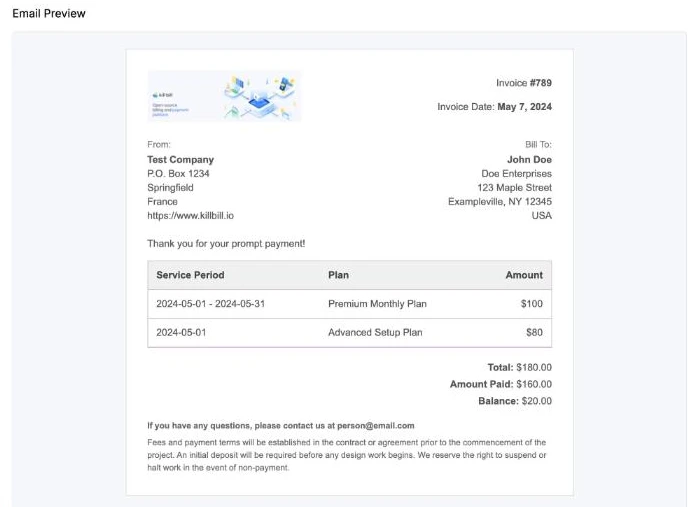
| Invoice and email templates | Templates uploaded per tenant through the API | Adds templates with your branding, edited in the interface |
| Operations | ||
| Interface | Kaui admin UI | Kaui, plus the Aviate Control Plane |
| Several deployments | Managed one by one | Managed from one Control Plane |
| Monitoring | Logs and your own tools | Adds Health: metrics, repair tools, diagnostic reports |
| Team access | Kill Bill users and roles | Adds members and API key management |
| Roadmap | ||
| Quote-to-cash | Not included | Quotes, orders, contracts, approvals Insider Preview |
| Revenue recognition | Not included | ASC 606 schedules and waterfall Insider Preview |
| Role-based access control | Kill Bill roles and permissions | Predefined and custom roles Insider Preview |
Support
Talk to the Engineers, Not a Ticket Queue
With Aviate, the people who answer your questions are the people who write the code.
Kill Bill open sourceCommunity help, free
- Kill Bill users mailing list
- GitHub issues
- Documentation on docs.killbill.io
- Security advisories and signed releases
- No support, no SLA
AviateLevel 3 support from the engineers
- Dedicated Slack channel with your team
- The engineers who build and maintain the platform, no help desk in between
- Response within 1 business day for P1 issues
- Help with CVEs that affect your deployment
- Aviate commercial license included
Control Plane
One Interface for Every Deployment
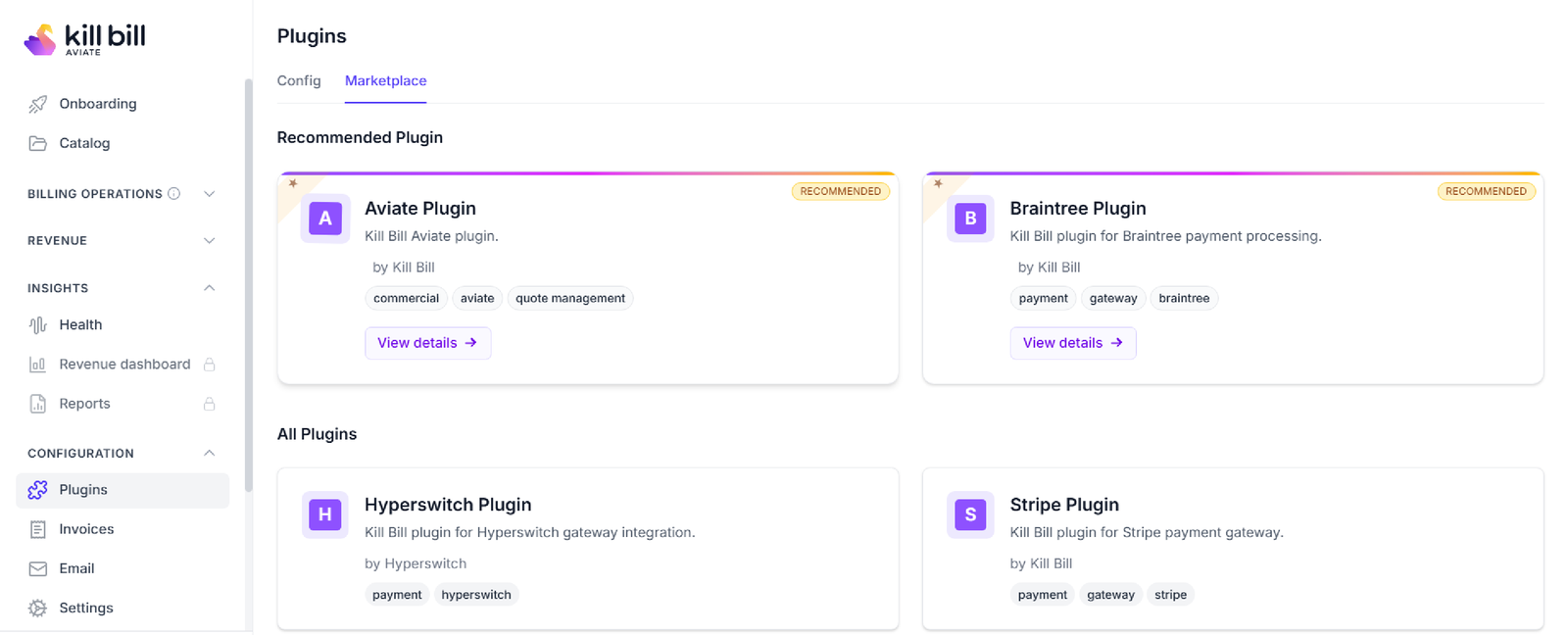
The Aviate Control Plane manages one or more Kill Bill deployments from your browser. It connects to each one through the Aviate plugin.
- Deployments: add each Kill Bill deployment with its URL and credentials, and switch between them
- Plugin marketplace: install, update and remove payment, tax and other plugins
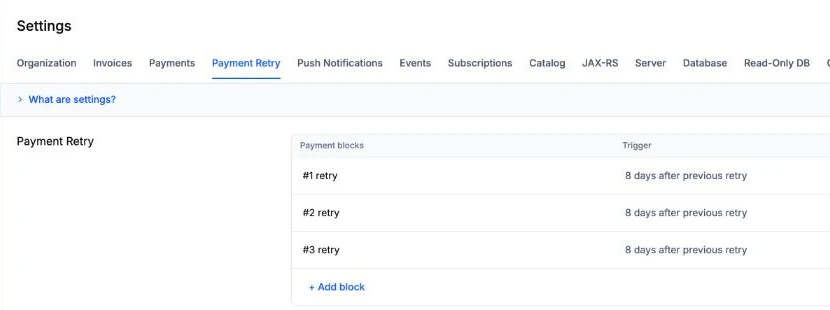
- Tenant settings: every Kill Bill property per tenant, with where each value comes from
- Invoice and email templates: with your logo, brand color and company details
- Members and API keys: invite team members, and create, rotate or revoke tenant API keys
- Onboarding: a checklist to start billing, with Docker and one-click AWS setup
- Kaui: links from Aviate into Kaui for account-level billing operations
Modules
What Aviate Adds, Module by Module
Ready-made modules on top of the open source engine, each with its documentation.
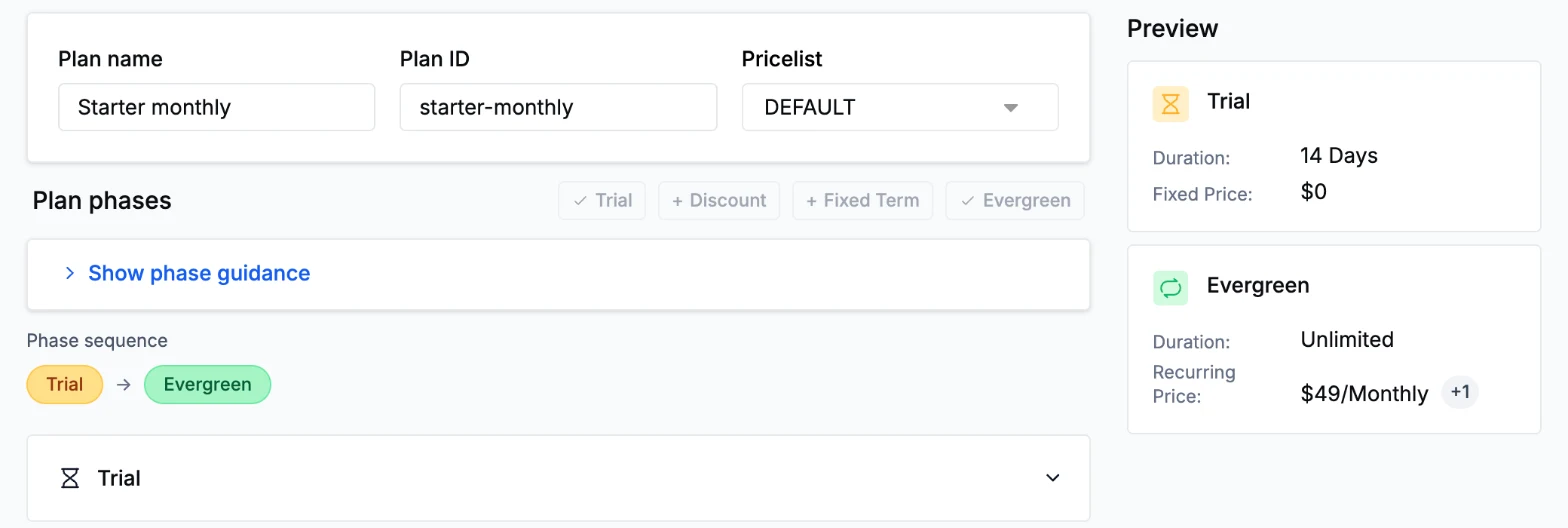
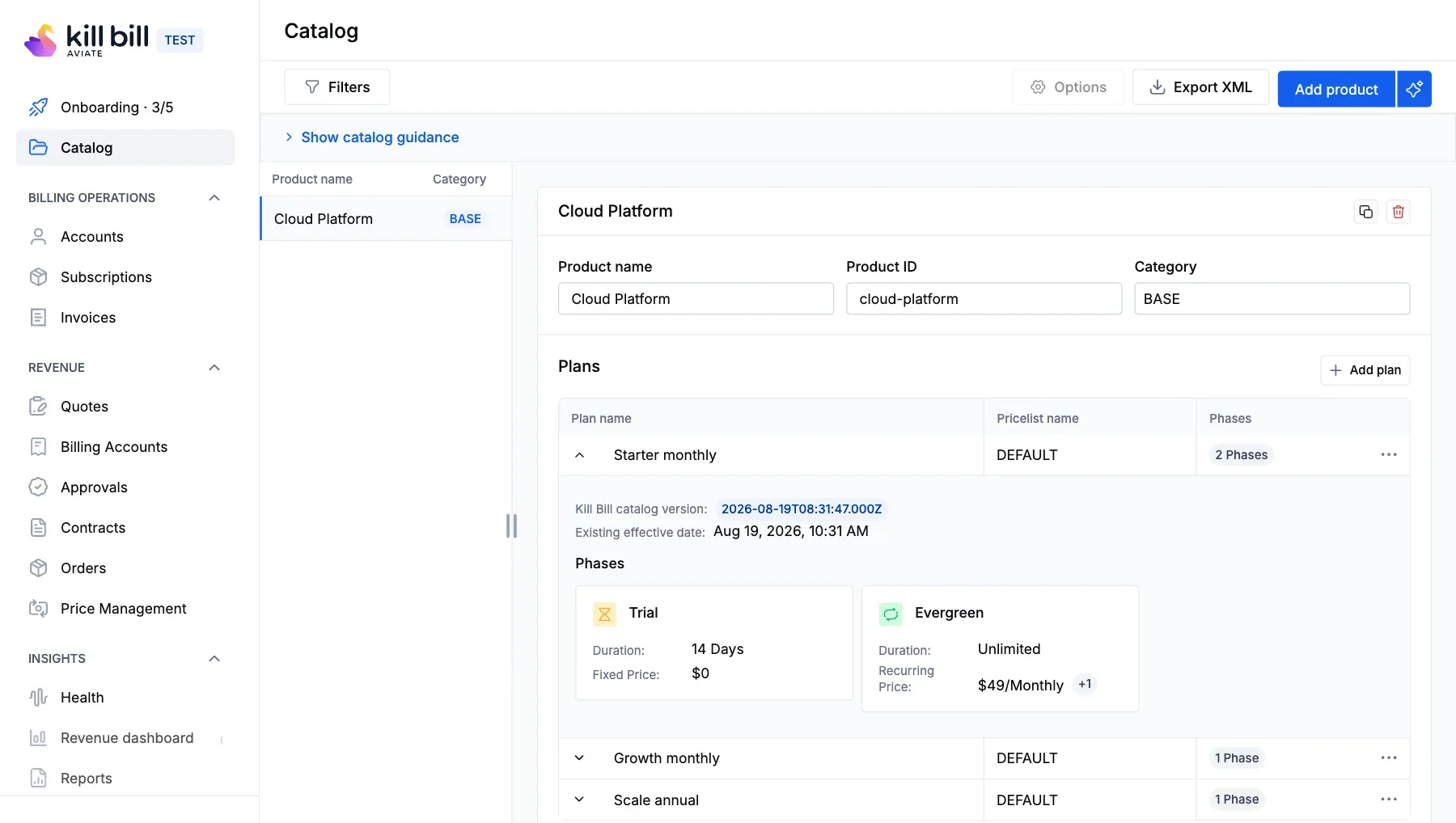
Catalog editorCreate products, plans and price lists in the interface, without a new XML catalog for each change. A price change creates a new plan version, and existing subscriptions keep theirs.Catalog guide →
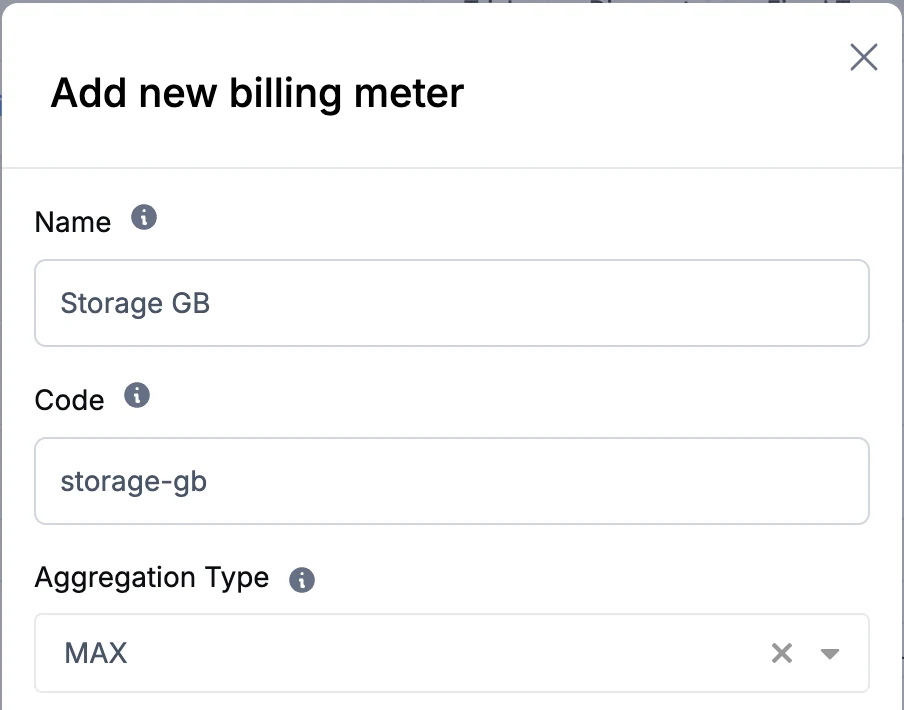
MeteringSend raw usage events and let Aviate aggregate them per billing meter: sum, max, count, latest or unique count. Events are idempotent, so retries do not double-bill.Metering guide →
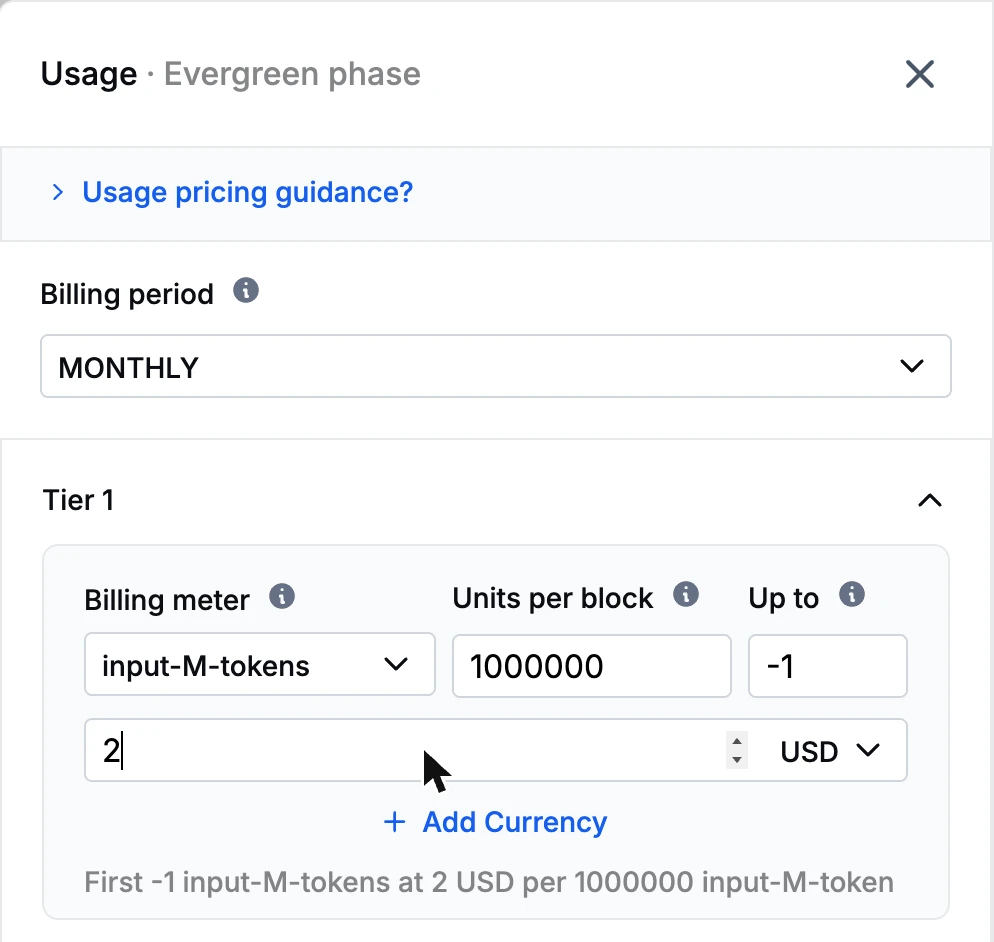
Usage pricingPrice usage per meter in blocks and tiers, in several currencies, for example AI tokens priced per million.AI usage tutorial →
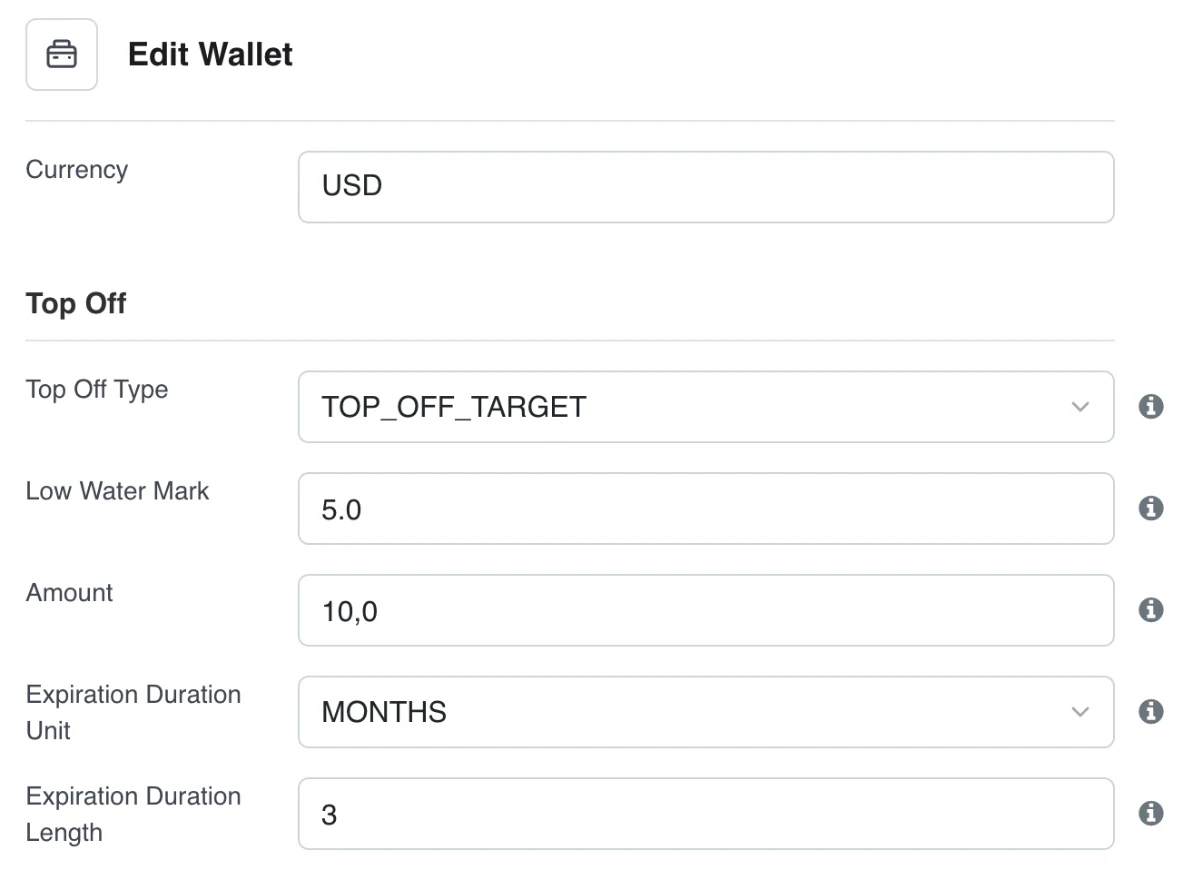
WalletPrepaid credits per account, free or paid, with automatic top-off below a threshold, expiration and a full ledger.Wallet guide →
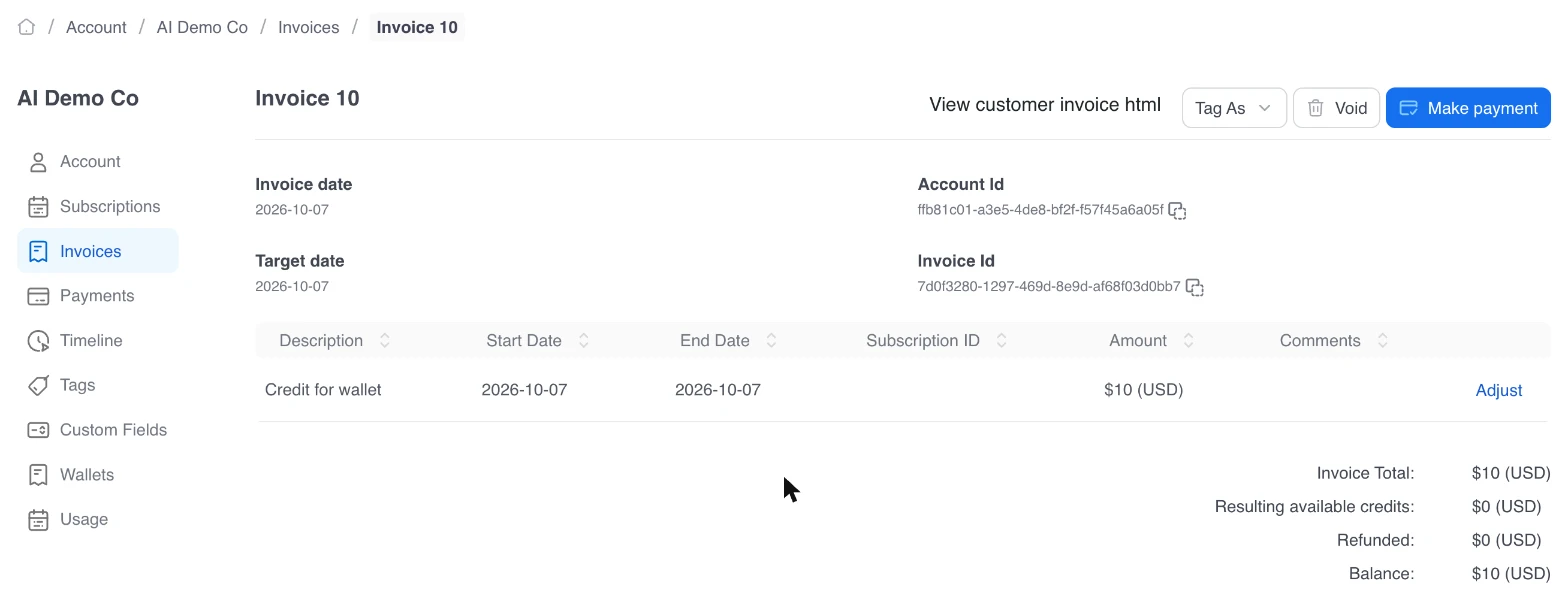
Paid credits on the invoicePaid credits are invoiced and charged to the default payment method, like any other charge.Wallet guide →
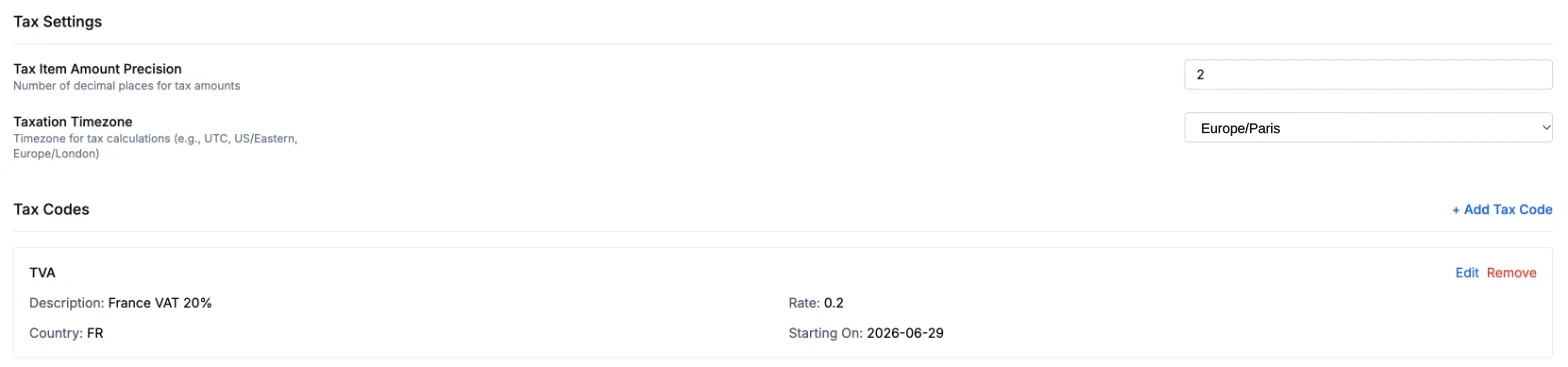
Aviate TaxTax codes with rates and validity dates, mapped to products, at country level. Exemption per billing account. No third-party tax engine needed.Tax guide →
WELCOME20
20% offLAUNCH50
50 USD offCoupon: WELCOME20
ITEM_ADJ -20.00CouponsFixed or percentage discounts, limited by plan, number of uses and expiration date, shown as a negative line on the invoice.Coupons guide →
Account A
INV-A-0001, 0002Account B
INV-B-0001Scope
PER_ACCOUNT | PER_TENANTInvoice numberingAn invoice number sequence per account or per tenant, with a prefix and suffix on templates.Sequencing guide →
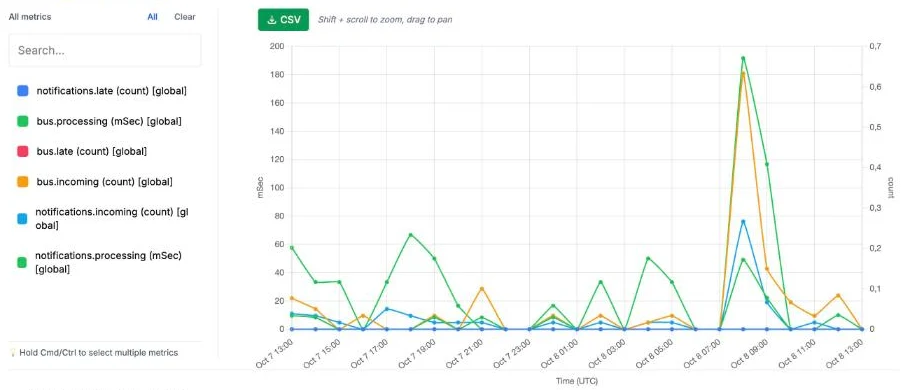
HealthPer-node metrics, bus and notification queues, parked accounts and failed events with repair actions, log streaming and diagnostic reports.Health guide →
Insider Preview
Quote-to-Cash, Revenue and Access Control, Next
Aviate customers and partners can join Insider Preview modules before they are generally available.
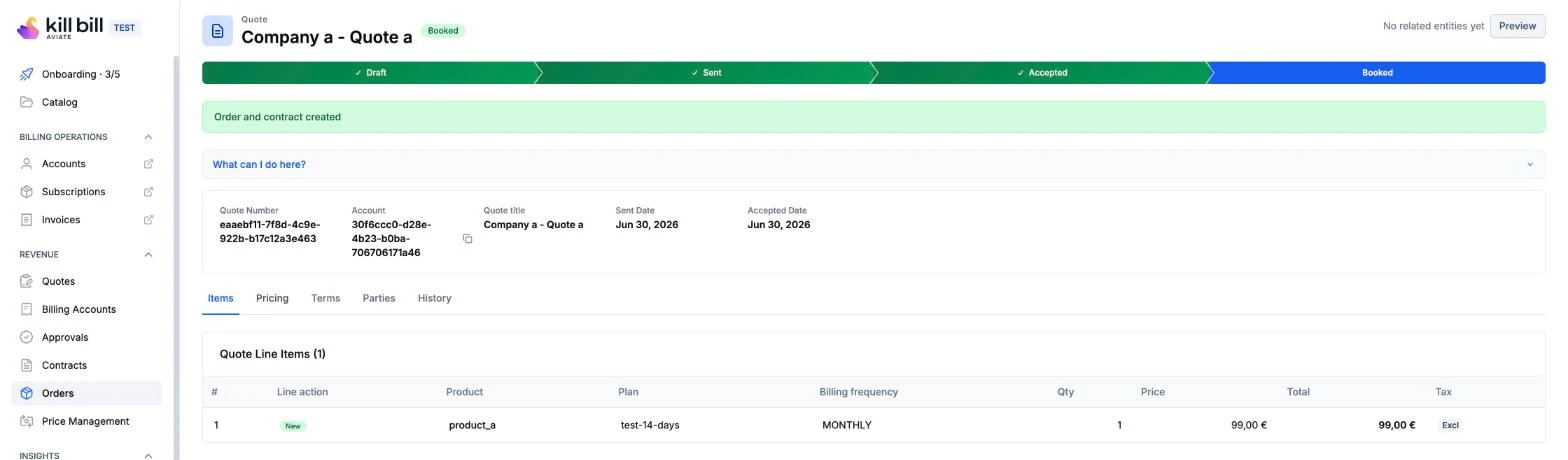
Insider PreviewProduct CatalogSpecifications, offerings and prices on the TM Forum model. Activating an offering creates the Kill Bill catalog entries.Insider PreviewQuotes and OrdersMulti-line quotes with versions and approval. An accepted quote becomes an order, a contract and active subscriptions.Insider PreviewContractsAgreements linked to their subscriptions, with milestones, renewal, suspension and termination.Insider PreviewApprovalsApproval rules by deal size, product, currency or country, with an inbox, timeouts and escalation.Insider PreviewRevenue RecognitionASC 606 schedules, allocation by standalone selling price, monthly periods and a waterfall report.Insider PreviewUsage RatingRating rules as expressions: volume and graduated tiers, and time-of-day or weekend multipliers.Insider PreviewBilling AccountsCompany details, addresses and tax registrations per account, used by tax, quotes and contracts.Insider PreviewIntentsOne declarative request for a business action, such as onboarding a customer or changing a plan, with a dry run and an audit trail.Insider PreviewAccess Control (RBAC)Predefined roles such as admin, finance or viewer, plus custom roles built from feature permissions.
Insider Preview modules are in active development, subject to change, and available to selected Aviate customers and partners. Release notes are in the Aviate changelog.
Works with
The Same Integrations, Open Source or Aviate
Payment and tax plugins, infrastructure and user directories work the same way under both.
 Stripe
 Braintree

 Kintsugi
Infrastructure
DockerKubernetesTomcatPostgreSQLMySQLMariaDBUser directories for Kill Bill roles
 Okta
Okta Auth0LDAPActive Directory
Which one fits
Choose by Team and by Need
Both run the same engine. The choice depends on your team, your billing and the support you need.
Kill Bill fits when- Your team can run and upgrade a Java service and its database
- Community help is enough, without an SLA
- The open source features cover your billing
- You want to start today, at no license cost
Aviate fits when- Complex billing: several pricing models, entities or currencies
- High volumes and strict finance and audit requirements
- You want Metering, Wallet, Coupons or Aviate Tax without building them
- You want the engineers on your Slack channel when something breaks
Moving between them
Start Open Source, Add Aviate Later
1Start with Kill BillRun the open source platform with Docker, in your cloud or data center, for free. Kaui is included.
2Add Aviate when you need itAviate is installed as a plugin on your Kill Bill deployment and connected to the Control Plane. Your accounts and history stay where they are.
3Keep your options openIf you stop Aviate, Kill Bill keeps running in your environment, under a license nobody can withdraw. Uninstalling the plugin leaves its tables in place.
FAQs
Frequently Asked Questions
What is the difference between Kill Bill and Aviate?
Kill Bill is the open source billing and payments platform, free under the Apache 2.0 license, with community help and no SLA. Aviate is the enterprise offer from the same team: a commercial license on top of Kill Bill that adds the Control Plane, modules such as Metering, Wallet, Coupons and Aviate Tax, and Level 3 support from the engineers.
Why pay for Aviate when Kill Bill is free?
For time and support. Aviate gives your team direct access to the engineers who build the platform, help with security issues, ready-made modules you would otherwise build yourself, one interface for all your deployments, health and repair tools, and early access to new modules. Kill Bill alone runs at scale; Aviate saves the work around it.
What does Aviate support include?
Level 3 support on a dedicated Slack channel, where your team talks directly to the engineers who build and maintain Kill Bill and Aviate, with a response within 1 business day for P1 issues. It includes help with CVEs that affect your deployment.
What is the Aviate Control Plane?
A browser interface to configure, monitor and manage one or more Kill Bill deployments from one place: plugins, tenants and their settings, invoice and email templates, team members, API keys and health. It connects to each deployment through the Aviate plugin.
Is Aviate a different product from Kill Bill?
No. Aviate runs on Kill Bill. It is installed as a plugin on your Kill Bill deployment, and the billing engine and APIs stay the same. Aviate adds modules, the Control Plane and support on top.
What does Aviate add to Kill Bill?
The Control Plane, a catalog editor and catalog API, Metering for raw usage events, Wallet for prepaid credits, Coupons, Aviate Tax, invoice numbering per account or tenant, branded invoice and email templates, Health, a plugin marketplace, member and API key management, and Level 3 support.
What are Aviate Insider Preview features?
Modules in active development, available to selected Aviate customers and partners and subject to change: Product Catalog, Quotes and Orders, Contracts, Approvals, Revenue Recognition (ASC 606), Usage Rating, Billing Accounts, Intents and role-based access control.
Does Aviate calculate tax?
Yes. Aviate Tax applies tax codes with rates and validity dates to products, at country level, without a third-party engine. Aviate also works with the open source tax plugins for Avalara AvaTax, Vertex and Kintsugi.
Does Aviate take a share of revenue?
No. Aviate is a flat annual fee. Neither Kill Bill nor Aviate charges a percentage of the revenue you bill or a fee per transaction. Current pricing is on the pricing page.
Is Kill Bill really free?
Yes. Kill Bill is open source under the Apache 2.0 license, with no license fee, no usage limit and no fee per transaction. It comes with no support and no SLA.
Can we start with Kill Bill and move to Aviate later?
Yes. Aviate is installed as a plugin on your existing Kill Bill deployment, so you can start with the open source platform and add Aviate when you need its modules or support.
What happens if we stop Aviate?
The open source platform keeps running. Kill Bill is deployed in your environment, under a license nobody can withdraw. Uninstalling the Aviate plugin does not remove its tables.
Where do Kill Bill and Aviate run?
Where you choose: any cloud or your own infrastructure, with Docker, Kubernetes or Tomcat, and PostgreSQL, MySQL or MariaDB. A free hosted sandbox lets you try Aviate in a browser.
Can I try Aviate before buying?
Yes. The free hosted sandbox at aviate.killbill.io runs Aviate in a browser, with nothing to install.
Not sure which one you need?
Try Aviate in the free sandbox, run Kill Bill locally, or talk to the team. A technical member of the team will reply.